
🛠️ Psydox QR Code Studio (From Psydox Toolbox)
Psydox QR Code Studio is a powerful desktop application that enables you to create professional, customizable, and reliable QR codes entirely offline.
Originally developed as a personal utility for my own projects, the application has gradually evolved over the years with additional features, improvements, and refinements. After using it extensively myself, I decided to polish it further and make it freely available to the community.
Whether you’re an individual, business owner, designer, educator, or software developer, Psydox QR Code Studio provides a complete set of tools for creating QR codes suitable for both personal and commercial use.
Unlike many web-based QR code generators, Psydox QR Code Studio runs natively on Windows. Your data remains on your computer, giving you complete privacy and allowing you to generate QR codes even without an internet connection.
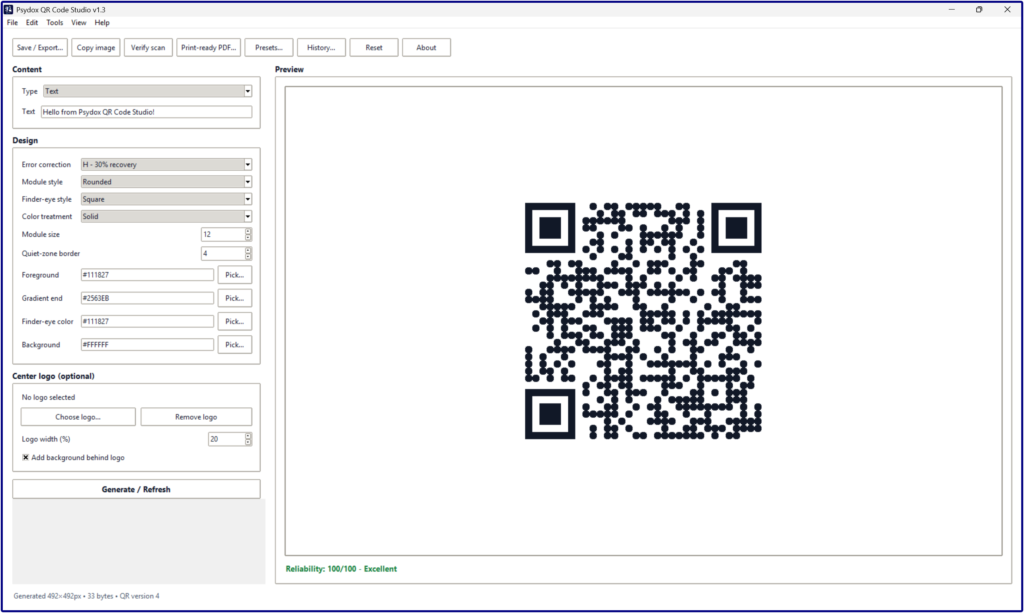
🎯 Generate Multiple QR Code Types
Create QR codes for a wide variety of applications, including:
- Plain Text
- Website URLs
- Wi-Fi Network Credentials
- SMS
- Telephone Numbers
- Contacts (vCard)
- Calendar Events
- GPS Locations
- Cryptocurrency Payment Addresses
- Social Media Profiles
- cation Deep Links
Whether you need a QR code for a business card, café menu, conference badge, digital payment, or marketing campaign, Psydox QR Code Studio has you covered.
🎨 Professional QR Code Customization
Every brand has its own identity, and your QR codes should reflect that.
Customize your QR codes using:
- Multiple module (pixel) styles
- Custom finder-eye styles
- Solid color designs
- Vertical gradients
- Horizontal gradients
- Radial gradients
- Background color customization
- Custom finder-eye colors
- Adjustable error correction levels
- Center logo embedding
- Live real-time preview
Design QR codes that are both visually attractive and highly scannable.
🛡 Built-in Scan Reliability Analysis
A beautiful QR code is only useful if it scans reliably.
Psydox QR Code Studio helps evaluate every design before you export it.
Features include:
- QR Code Scan Verification
- Reliability Score
- Contrast Analysis
- Design Validation
- Error Correction Recommendations
These tools help minimize scanning failures caused by poor color choices, oversized logos, or excessive styling.
💾 Save Your Work
Save your work and continue editing later.
Included features:
- Save & Load Project Files
- Password-Protected Projects
- Design Presets
- Generation History
- Reusable Templates
Perfect for businesses and professionals who frequently generate QR codes.
📤 Export in Multiple Formats
Export your QR codes for both digital and printed media.
Supported formats include:
- PNG
- SVG (Scalable Vector Graphics)
- JPG
- WebP
- BMP
- Print-Ready PDF
Whether you’re printing labels, menus, flyers, banners, posters, business cards, or product packaging, the application provides the format you need.
🖥 Modern User Experience
A clean and intuitive interface designed for productivity.
Features include:
- Light Theme
- Dark Theme
- Responsive Live Preview
- Native Windows Desktop Experience
- Simple and Easy-to-Use Interface
No unnecessary complexity. Just a clean workflow focused on QR code creation.
⭐ Why Choose Psydox QR Code Studio?
Many online QR code generators require uploading your information to remote servers, offer limited customization, or hide advanced features behind subscriptions.
Psydox QR Code Studio takes a different approach.
✔ Works completely offline
✔ Your data never leaves your computer
✔ No advertisements
✔ No subscriptions
✔ No account required
✔ No internet connection required
Ideal for creating QR codes for:
- Business Cards
- Restaurant Menus
- Product Packaging
- Flyers
- Posters
- Event Registration
- Digital Payments
- Contact Information
- Educational Materials
- Inventory Labels
- Software Downloads
- Personal Projects
💻 System Requirements
Operating System:
- Windows 10 (64-bit)
- Windows 11 (64-bit)
Currently available exclusively for Microsoft Windows.
Processor:
- Intel Dual-Core Processor or newer
- AMD Dual-Core Processor or newer
Memory:
- Minimum: 4 GB RAM
- Recommended: 8 GB RAM
Storage:
- Approximately 210 MB of available disk space
⬇ Download
Latest Release: Psydox QR Code Studio v1.3
Platform: Microsoft Windows (64-bit)
Installer: PsydoxQRCodeStudio-v1.3-Setup.exe
📜 License
Psydox QR Code Studio is proprietary software.
The application is provided free of charge as a compiled Windows executable for both personal and commercial use.
The source code is not included and is not open source.
Please refer to:
- LICENSE.txt
- THIRD_PARTY_LICENSES.txt
for complete licensing information.
👨💻 About the Project
Psydox QR Code Studio started as a small utility that I developed several years ago to make QR code creation easier for my own projects.
Over time, I continued improving it by adding features such as project management, presets, scan verification, reliability analysis, advanced customization, and professional export capabilities.
Eventually, it grew into something much more capable than originally intended.
Instead of keeping it solely for personal use, I decided to polish it further and release it to the community in the hope that it will also be useful to students, businesses, developers, designers, and anyone who regularly works with QR codes.
This marks the first public release of the application, and I look forward to improving it even further in future versions.
💬 Feedback
If you discover a bug, have an idea for a new feature, or simply have suggestions on how Psydox QR Code Studio can be improved, I would be happy to hear from you.
Your feedback helps shape future releases and makes the application better for everyone.
Thank you for downloading Psydox QR Code Studio. I sincerely hope it becomes a useful tool in your everyday projects.
☕ Support My Craft
If you enjoy following the Gamepenter journey and would like to support its continued development, consider visiting the Support Me page.
Your support helps fund software development tools, testing environments, learning resources, technical writing, and ongoing work on Gamepenter, Gamepenter Studio, and other independent technology projects.
Every contribution, no matter the size, helps keep these projects moving forward.